


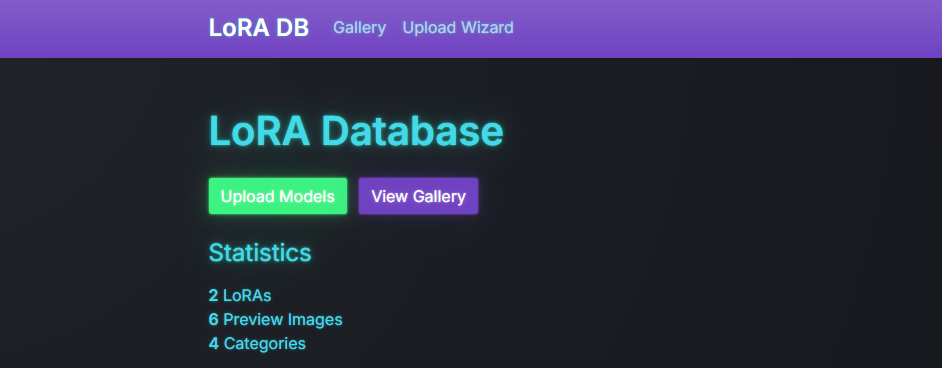
MyLora had a Shoutout Article at TurtlesAI! Check it out! =)
It’s been a long time... but I finally did it.
The dream of my own LoRA database has come true —
and now, I want to share it with all of you.
Notice to everyone who read this:
I need some Testers and Reviewer on Github.
If you feel safe in Testing things, feel free to reach out on Github =)
🔥 MyLora – One Site to Rule Them All (Open Source & Self-Hosted)
Sick of chaotic model folders, missing previews, or online model managers that want your soul (and data)?
Meet MyLora – your own sleek, local LoRA hub. No cloud. No nonsense. Just full control.
🧩 What is MyLora?
MyLora is a self-hosted web application that helps you manage your .safetensors LoRA models in a clean, searchable gallery with auto-tagging, previews, categories, and metadata – all from the comfort of your local machine.
It’s Open Source (MIT license), fast to deploy, and tailored for people who want control without compromise.
🛠️ Key Features
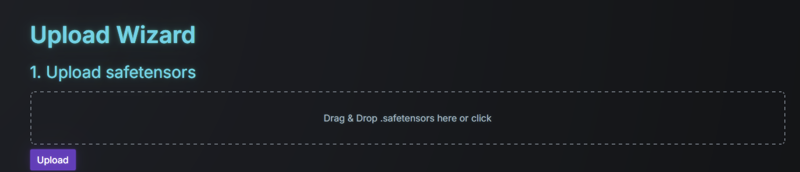
⚡ One-click upload wizard
Drag & drop your model + preview images and let the app handle the rest.🔮 Auto metadata extraction
Tags, resolution, architecture – everything is parsed and indexed.🧠 Smart tag indexing
Includesss_tag_frequencyand other meaningful stats for power users.🖼️ Searchable grid gallery
Infinite scroll, search bar, category filters – and everything links to model detail pages.📁 Local-first category management
Add, remove or migrate categories directly within the app.📦 Bulk import & legacy migration scripts
Got an existing collection? Bring it in with one command.🌒 Dark mode by default
Because Light Mode is for... pacifists. 😌👤 User accounts
Login/logout with role-based permissions and secure session cookies.🎭 Guest mode
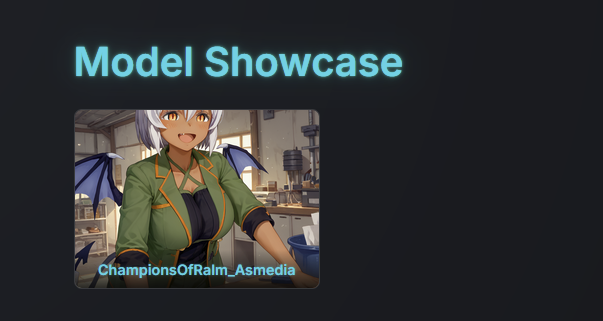
Visitors are redirected to a public "Model Showcase" with preview-only details.🛡️ Admin tools
Manage users via web UI – and bootstrap the first admin withusersetup.py.🚧 Themed error pages
Friendly 404 and access denied pages. Yes, even your mistakes look nice.
⚙️ Requirements
MyLora is tested and stable on:
Linux (Ubuntu 22.04 & 24.04)
Python 3.12.3 or newer
venv+piprequired (standard in most Python installations)
Other systems might work, but support is focused on Linux environments for now.
🚀 Installation (One-Liner Setup)
Get up and running in seconds:
curl -sL https://raw.githubusercontent.com/AsaTyr2018/MyLora/main/setup.sh | sudo bash -s install
Once installed, visit:
📍 http://{serverip}:5000
Updating or removing is just as easy:
sudo ./setup.sh update       # to update  (Can be done while it's still running)
sudo ./setup.sh uninstall    # to remove (Like install, just... Uno Reverse)
Docker Support
As promised, MyLora is now available via Docker!
You can find the official Docker Compose file here:
👉 MyLora Docker Compose (GitHub)
How to run it:
Download the
docker-compose.yml.Place it in its own secure folder (recommended, since data will be mapped externally).
Run:
docker compose up -d
Persistent Volumes
MyLora stores important data outside of the container for easy backup and portability:
volumes:
  - ./loradb/uploads:/app/loradb/uploads        # User uploads (LoRAs, images, etc.)
  - ./loradb/search_index:/app/loradb/search_index  # Search index data
Make sure these folders exist next to your docker-compose.yml.
Ports
Default port:
5000
Accessible viahttp://localhost:5000
Admin Setup
Since the latest version, at least one Admin user is required.
Without Docker:
python3 ./usersetup.py <username> <password>
With Docker:
docker exec <container_name> python3 ./usersetup.py <username> <password>
Replace <container_name> with the name of your running container
(you can check it with docker ps).
That’s it!
Once the Admin user is created, MyLora is ready to go.
Happy prompting!
🤘 Why Self-Host?
No third-party cloud.
No upload limits.
No account needed.
No tracking.
Just your models, your rules.
🧠 Tech Stack
Built with FastAPI, served via Uvicorn
Uses SQLite for local database storage
Fully responsive UI (desktop & mobile)
REST API available for local automation workflows
MIT Licensed – free forever
📦 GitHub
👉 Get it here
Stars appreciated! ⭐
🧙 Final Words
MyLora isn't just a viewer – it's your personal model sanctuary.
Made by a creator, for creators who want speed, structure, and sovereignty over their AI workflows.
Let your models live in a home that actually respects them –
One site to rule them all.
Bulk Uploader (NEW)
MyLoRA‑Uploader (See in the Attachments of this Post)
A simple but powerful bulk uploader for MyLoRA – your all‑in‑one LoRA hosting solution.
This script:
Logs in automatically to your MyLoRA server for each upload cycle.
Uploads LoRA
.safetensorsmodels and their preview images (matched by folder name).Keeps track of successfully uploaded models in
uploaded.txt– no duplicates, no rework.CLI‑friendly: easily specify server, credentials, and directories.
How it works
Place your LoRAs in one directory (e.g.,
Q:\LoraTrainingDone).Place your preview images in folders with the same name as the LoRA file (e.g.,
W:\fooocus\outputs\Done\MyModel\preview1.png).Important: Check the python script content for Configs!!
Run the script – it pairs LoRAs with their previews and uploads them to MyLoRA.
Successfully uploaded models are logged in
uploaded.txtso the script only processes new ones next time.
Command‑line usage
python MyLoRA-Uploader.py \
  --server http://192.168.1.15:5000 \
  --user admin \
  --password mysupersecretthatiwoulddefinitlynotpostpublic:P \
  --lora-dir Q:\LoraTrainingDone \
  --preview-dir W:\fooocus\outputs\Done
Parameters:
--server→ URL of your MyLoRA instance (e.g.,http://192.168.1.15:5000).--user/--password→ MyLoRA login credentials (must be Admin).--lora-dir→ Folder containing all.safetensorsfiles.--preview-dir→ Folder containing subfolders with matching previews.
Example folder structure
Q:\LoraTrainingDone\
    MyModel.safetensors
    AnotherOne.safetensors

W:\fooocus\outputs\Done\
    MyModel\
        preview1.png
        preview2.png
    AnotherOne\
        cover.jpg
Update Table:
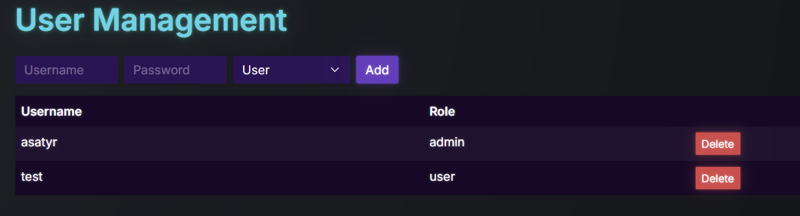
07/04/2025 - User Management, Public Viewing, Error Handling
User accounts – login/logout with role-based permissions and secure session cookies.
Guest mode – visitors are redirected to a public "Model Showcase" with preview-only details.
Themed error pages – friendly 404 page and access denied view. (Easter Egg warning :P)
Redifined Upload Wizzard
07/03/2025 - New Dashboard, Category Management
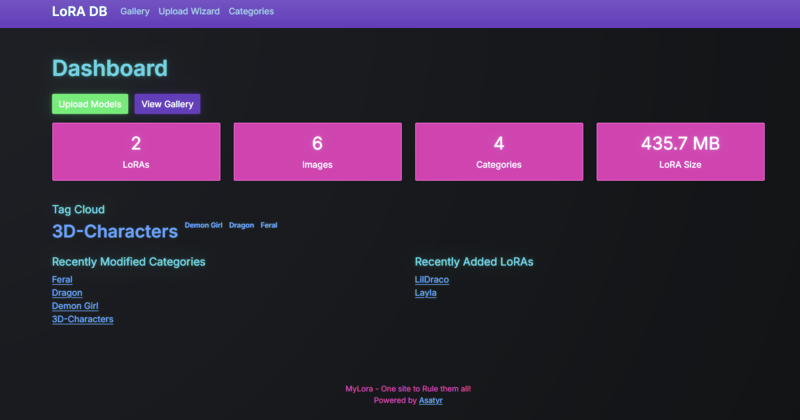
Updated Dashboard
Fixed Preview_image to LoRA filters
Added Bulk add for Categorys
06/30/2025 - Fix untrusted URL redirection vulnerability
06/28/2025 - API and Docker
- Added a full API usage Guide --> Wiki
- Added Automatic Docker Setup Builder for Linux and Windows (Alpha Test)
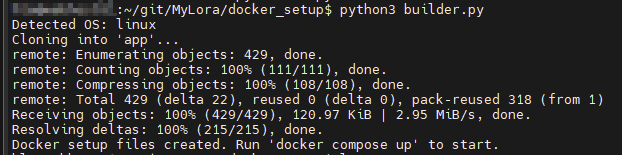
- Added docker Build Updater.
06/26/2025 - Category Update
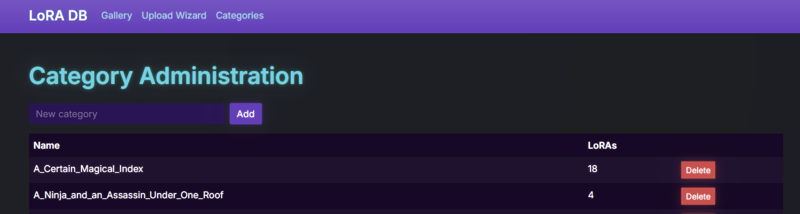
- Addet Category Administration
Testrun
I tested the Application on a Ubuntu Linux Server. Even with a huge quantity on Loras and Preview Images the site runs smoothly.
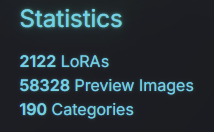
Specs: 4 core, 4gb Ram, SSD/NVME Drives (Old Lenovo tiny PC)