
lately i've been feeling a bit mad at society. at how society lies to us. we can't trust anybody anymore. you think someone knows what they're talking about, they're reading off chatgpt. you think they are listening to you, they're asking chatgpt to summarize your post. this is all a psyop by the big government to keep us ignorant about how to train anime boy loras, btw. so i'm writing an guide about what is really real. the gritty truth about lora training params that nobody tells you about because they have no idea and they're just parroting some article from shakker written by someone who also has no idea what they're talking about and they're just trying to bullshit their way for 12 bullet points and 16 paragraphs for seo purposes
REAL FACTS (TRUE AND FACTUAL ONLY!!!)
checkpoint
all loras are trained on top of a checkpoint. basically you have a checkpoint like sdxl or illustrious with a bunch of weights. the lora "patches" the checkpoint, which basically creates a new checkpoint with modified weights.
like imagine there is a weight in sdxl that is 7. and the lora makes it 8. so basically the lora is adding +1 to the weight. but on illustrious that same weight is 5. if you use the lora trained on sdxl on illustrious, it's going to +1 the same weight but instead of making it 8 it's going to make it 6
personally i always train on the base model (illustrious). that's because on illustrious it takes 30 steps to gen something that doesn't look like utter garbage, but on a fine tune like hassaku it only takes 11 steps. if you train the lora on illustrious, hassaku can add its special sauce to speed the rendering up. but if you train the lora on hassaku, then it's going to take 30 steps on hassaku to gen anything good.
some ppl say it's better to train on fine tunes instead but idk if it's true!! SHOW ME SOME PROOF!!
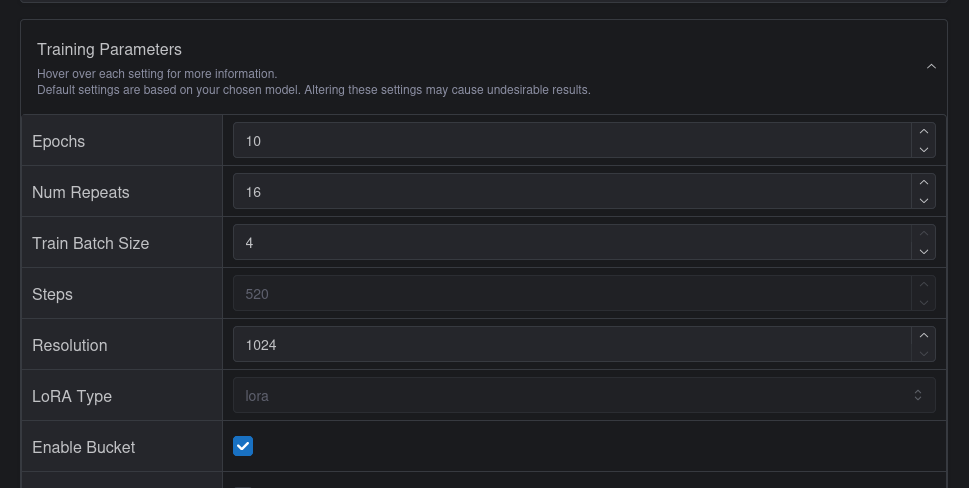
steps / repeats / epoches / batch size
so this is where the bullshitering begins... so to train a lora, you take a bunch of pics and upload it to the trainer. basically the trainer goes through the whole dataset and figures out why the checkpoint isn't rendering the image right with that caption, and then it changes the lora which changes the checkpoint and tries again. every time it does this for the whole dataset it's called an "epoch".
but there's a catch... if you have 100 images, you can't train all of them at once because the gpu doesn't have enough vram. the number of images that goes in the vram at once is called "batch size". so if 4 images go into a single batch that is 4 batch size
but there is ANOTHER catch. it takes a ridiculous amount of "updates" to adjust the weights until it actually renders what it's supposed to correctly. these "updates" are called "steps" like it's walking toward a direction. if we only updated once per epoch but it takes 25 batches to go through the entire epoch, it's going to take an insanely long time to take even the first step. so basically what it does instead is it just does the update without going through the entire dataset so it's faster. basically this means in 1 epoch with 25 steps there's going to be 25 updates to the lora.
so here is the other catch... this means that the first 4 images of the dataset are trained with one checkpoint (like illustrious without any changes), but the next 4 images are trained with a different model (because now the lora weights changed). and depending on the order of the images / what is in the batch the direction the lora is updated changes
now here is the big catch that everyone seems to be completely blind about for some damn reason... the order of the images is randomize in the trainer. and "repeats" literally "repeats" the same image N times. you're probably asking urself why would anyone want to increase repeats instead of just increasing the epoches when the two mean the exact same thing... when there is only one reason. in kohya ss (the app civitai uses to train when u use their trainer) u can randomize the saturation/contrast of images during the training so when it says "repeats" it actually means "creates N copies of this image but randomize them a bit so it's not literally the same image N images in a single epoch." we can't do any of this in civitai's trainer. the only setting that actually has any effect with repeats in civitai is "flip augmentation". so basically if you aren't using flip augmentation you should just set repeats to "1" because if you set it too high you're going to run into one of the most stupid problems ever. if ur batch size is 4 and ur repeats are bigger than 4 and ur literally just copying and pasting the same image 4 times, that means there is a chance all four images in a single batch are going to be literally the same image and that is bad.
update!!! i've been informed that civitai trainer gens 3 preview images per epoch even if it doesn't show you the preview images which means u actually probably shouldn't use 1 repeat with 340 epoches to train a lora since it will gen 1020 images that will go directly into the trash never seen by anyone :( that's just such a waste!!
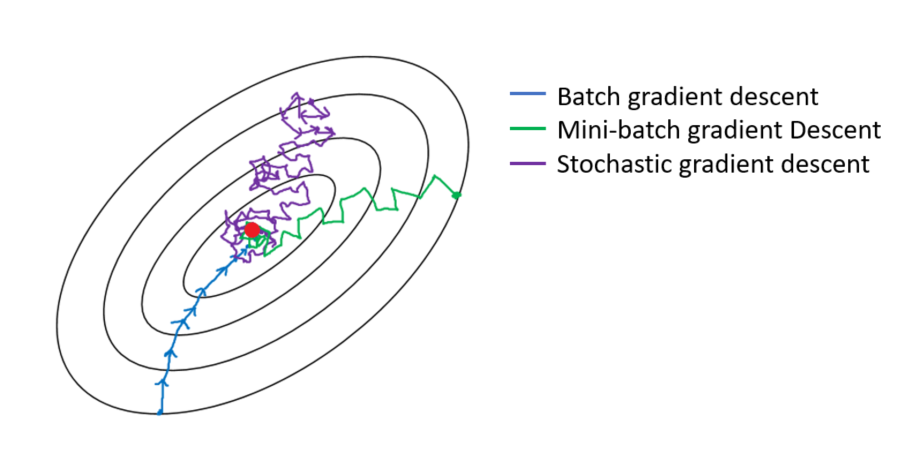
so about batch size... basically the ideal is you put the entire dataset into the gpu... the trainer figures out the right "changes" for each image, calculates the "average" for the entire dataset and updates the weights. this is called "batch gradient descent". the opposite of this is "stochastic gradient descent". basically you train 1 image and immediately update the model. to do this batch size needs to be 1 because you need to update the model before the next image is trained. so the problem with this is that the weights for 1 image can conflict with the weights for another image in the same dataset so the training just kind of zig-zags around. and finally "mini-batch gradient descent" which means you have a batch size larger than 1 but smaller than the entire dataset, which is better than 1 but not as good as the ideal. btw one thing lots of people get wrong about this is that "batch" isn't really about how many images you put in the gpu, but how many images are trained with the same weights. the weights are all numbers so you literally could train 4 images in one "gpu batch", NOT update the model, reuse the same weights to train the next 4 images and then just merge the results together and that would be like "8 batch size" except it takes twice as long because you waited before updating the model. but anyways you can see why you would want to avoid having 4 copies of the same image trained in a single batch... it's going to "pull" the zig-zag all the way to that zag and turn training into a much more gacha process than it already is
so why do i recommend using less reps and more batch size instead of more reps and less batch size if it's the same thing anyway and everyone recommends doing it the other way around? because of the optimizer. idk if it's true or not so it's just me guessing it but the optimizer MAY (or MAY NOT (idk)) use the size of the dataset to figure out how to optimize the training. if u use rep ur LYING TO THE OPTIMIZER!!!! lying is bad, okay? ur making the optimizer look like mao zedong if u tell it u have 200 pics of ur waifu when u actually only have 10 pics and ur doing 20 reps for each pic. don't do that. be honest. it's okay if ur dataset is small. don't worry about it. nothing to be ashamed about
buzz cost / high steps / high epoches
btw pro tip... by default civitai sets the lora to 500 steps and it charges you 500 buzz, but the price is still 500 buzz even if you make it 1000 steps. also 2000 steps is 700 buzz and 3000 steps is 1000 buzz
there is no real problem with having more epoches. civitai will let u download 20 epoches but if you have 40 epoches it's simply going to skip 1 epoch every time, like u can download 1st and 3rd epoch but not 2nd because they didn't save the 2nd epoch. at this very moment i'm training a lora with 340 epoches and it just jumped from epoch #52 to epoch #69 (nice!)
the real problem is having more steps... no matter what settings you use, a lora trained for too long is ALWAYS going to break something. fingers are going to look weird, arms are going to go missing. sometimes the jpeg gets burned into the lora. more steps isn't always good. for complex concepts, but for simple things like characters it's not needed. for styles it depends on how much fidelity you want because in general styles are pretty easy to train since anything that looks even a bit like the style you want to train is technically a style lora. wouldn't hurt to use high steps and then choose a lower lora instead
also... civitai takes longer to train a lora if it has more epoches. idk what it's doing or why it happens. idk if it's a kohya thing. all i know is that it's been 2 and a half hours and my 340 epoch lora is still at its 140 epoch. BUT AT LEAST I AM NOT A LIAR!!! i now know civitai is genning 3 preview images every epoch even if it doesn't show me. ouch.
resolution
sdxl and illustrious v0.1 were trained on 1 megapixel images so u set this to 1024. i don't know the effect of changing this value to less or more than 1024. all i know is that if u set it to 512, ur images till be scaled down during training
btw based on personal experience if u have small images their effect on the training is proportional to their size. so basically a 1024x1024 image has the same effect as training as 512x512 image 4 times and 16 times for 256x256. i often train with very small crops for concepts to avoid training things it shouldn't so sometimes this becomes a problem. btw on civitai images need to be at minimum 256 pixels on one side for them to be used in training so if ur cropping like me remember use crop rectangles that are at least 256 pixels
enable bucket
unless all your images are perfect squares you need this to be enabled, but if u enable this u should understand what it does...
basically it creates rectangular buckets to put the images inside during training if they aren't perfect 1024x1024 squares (if ur using 1024 resolution)
UR IMAGES WILL BE CHOPPED TO FIT THE BUCKET!!! CHOP CHOP CHOP!!!
basically this means u don't want to have the most important thing of your image at the edge of the image because there is a chance kohya will automatically crop it out. also you don't want to put something in the caption if it's going to be cropped out either lmao. kohya makes buckets of all sorts of sizes and you don't need the image to be the perfect size it just needs to be the perfect aspect ratio. like there is going to be a bucket for 1024x512 and 512x256 so anything that is exactly twice as wide as it's tall is going to be in one of those buckets and if it's close enough it will be cropped to fit those buckets
https://github.com/bmaltais/kohya_ss/discussions/2861
shuffle tags / keep tokens
if ur using tags (separate by comma (which u should if ur using illustrious)) then shuffle tags shuffles the tags randomly every time an image is trained instead of leaving them in the same order
"keep tokens" skips shuffling the first N tags. u can set this from 0 to 3 on civitai. this is a kohya setting with a crazy stupid name. as u may know, stable diffusion works by turning the text prompt into something called "tokens" and sometimes 1 word is 1 token, sometimes 1 word is multiple times and sometimes multiple words is 1 token. anyways this doesn't matter at all in this case because "keep tokens" probably means "keep tags" and it just has a godawful bad name. i mean it's hard to imagine it means actual tokens because that would be more than useless it would be actually anti-useful since it would mean something like "sunflower" would get tokenized into "sun" and "flower" and kohya would send "flower" elsewhere for some goddamn reason. btw the commas are also tokenized in sdxl so if it was really really true that means even the comma would count as a token for this setting which is just completely insane and worthless and would have no practical use case whatsoever. https://github.com/bmaltais/kohya_ss/issues/70
anyway the reason why this is a setting to begin with is that tokens at the start of the prompt have stronger value. that's the reason 1boy is one of the first things you put in the prompt. basically the idea is that in your caption the first tag should be the most important tag so u set keep tokens to 1 and it keeps that important tag in the same first spot while shuffling the rest of the tags
if u use the "trigger word" option in civitai, when it uploads ur dataset for step 3 (the training params), civitai actually changes ur captions before uploading it by adding the trigger word as the first tag of every caption. if u download ur dataset later u can see the trigger word added to the captions. basically this means if u use a trigger word, u can set shuffle tags and keep tokens to 1 and it won't shuffle ur trigger word. if ur trigger word has commas, u will have to increase the keep tokens by the number of tags ur trigger word has
clip skip
leave this 1.
civitai still says to set this to "2 for anime" but that's probably because in the sd1.5 days the anime checkpoints recommended 2 clip skip. illustrious was trained with 1 clip skip so changing this is unnecessary
flip augmentation
this flips ur images randomly horizontally and only horizontally. so there is a few things to consider about this option...
first off, if ur training a character that is NOT symmetrical, like they have a mole under their right eye for example, obviously you don't want to enable this or they will get moles on both eyes. same for asymmetrical hairstyles, etc.
but if u don't set this u should try to have at least one image of the character facing left and one of them facing right or the lora will be trained to only render the image in one direction
if ur training symmetrical concepts... specially things that are always viewing from the front (or back) of a person, like neckties for example, then u should enable this
for styles and other concepts, it's a matter of preference imo. personally i would say it should be disabled because, like, let's say there is an artist... and he always draws characters facing right for some reason. that's technically part of his style, no? so if we flipped it, it wouldn't be his style anymore. loras can learn all sorts of things that aren't obvious for humans so imo we should just give it the REAL AUTHENTIC dataset instead of giving it modified copies (LIES!!!!)
also... flipping the dataset means ur making it twice as big artificially. for example if u have 10 images and u flip it, then technically u have 20 images now, this might make it harder for the lora to learn things that depend on the direction while making it learn things that don't easier. like, if u try to train someone holding an object, the lora is going to learn the style of the artists in the dataset twice as much, but now it needs to do twice the work to learn the actual holding since sometimes it's the left hand while other times it's the right hand. also for poses... most of the time people will hold something with the right hand. u will need the left hand in the training data if u want to gen it sometimes, but maybe it would be easier to train only the right hand and just flip the image before inpainting if u want to the left hands? idk if anyone else would figured this out
UNET LR / Text Encoder LR
these are the learning rates for the unet and text encoder (aka TE LR). basically this is how big each "step" is supposed to be
so if u remember the image above, the problem is that each step is just guessing where to go and it's possible to "overshoot" but it's actually way more complicated than that because sometimes you overshoot so hard you can't go back to where u started later. like imagine you are in a valley between mountains. if u step on a bomb and it catapults u all the way over a mountain, u probably won't be able to go back to that valley ever again unless u find another bomb that explodes u to the perfect direction. lora training is the same thing
so u don't an LR too large. can it be too small? yeah actually...
if the LR is way too small the weight changes will be rounded down to zero so the model won't learn anything. so it needs to be not too large and not too small
for UNET here is what i know...
if u set the LR too high (like even the default 0.0005) the lora will start learning the styles instead of the concept. this is very bad for me because a lot of my loras for the anime model are trained on real life pictures which means everyone gains noses all of sudden. on the other hand if the LR is too low, it won't learn the concept correctly if it's a detailed concept. normally u want to err on the high side because u can use an earlier epoch if the lora messes everything or u can use the lora with inpainting or u can even change the weight of the lora. u have all these options too fix a lora that is "too strong" but u can't do anything if the lora turns out too weak. btw, u can actually take a lora and keep training it after the training finished in kohya, but civitai doesn't let u do that, so if ur only option is training on civitai u'll probably want to err on the high side so u don't waste 500 buzz with nothing to show for it
the text encoder LR i honestly have no idea about. you can set this to 0 and the training will work. u will get a smaller lora that doesn't change the text encoder. i've heard some ppl say that u shouldn't set this to higher than zero on SDXL because it messes up the training with some optimizers but based on my personal experience sometimes training the text encoder actually makes it learn complex concepts (for styles it's probably unnecessary) so i genuinely have no idea. i also have no idea what happens if u overtrain the text encoder. i have no idea if ur supposed to set this to high if u have a long caption or ur inventing new terms. i have no idea about anything and i'm not made out of buzz so i'm not that keen to experiment just to find out
btw if u use the prodigy optimizer THESE SETTINGS WILL BE IGNORED. like i said SOME PEOPLE say that training the text encoder is bad. idk if it's true. what i do know is that if u use prodigy u don't have the option (in civitai) to not train the text encoder. it's always trained and ur LRs don't matter
the LR also depends on other factors...
how many images u have in ur dataset? because if u have 10 images with hundreds of epoches, u don't need a very high LR since the same image is going to be seen hundreds of times
what is your network DIM and alpha? high DIM/alpha has stronger effects so it can use lower LR. meanwhile if ur alpha is 1 u can literally set this to the unet LR to 0.004 (that's only 3 zeroes) and somehow it won't mess everything up (i'm not saying the result will be good tho...)
generally 0.0001 unet LR = too low in most cases while 0.001 LR = too high in most cases, so the default 0.0005 is actually going to be good enough most of the time
LR scheduler
this lets ur change the effective LR as the training goes on. the "constant" scheduler just uses the same LR while linear/cosine make it smaller and smaller in the last epoches. basically the idea is that the first epoches "jump" toward the general direction u want and the rest of the training is trying to get the details right. the last epoches basically end up not changing anything at all
so what this means is that if u set 0.0005 LR for example it's only 0.0005 for the first step and then it goes down with each step (step, not epoch) which means in the same epoch different images will be trained with different LRs
generally cosine is recommended. sometimes i try to use the constant scheduler but i keep forgetting to make the LR lower to compensate for the fact it doesn't decrease during training so idk which one is best honestly
cycles
with the cosine scheduler this will "restart" the LR N times during training which theoretically improves training. basically this means a few things
1st the "jumps" at the start are shorter since the LR starts going down quicker. it probably doesn't make any difference since you get extra jumps later, but it could matter if ur dataset is very large and ur batch size very small. like with 1 batch size, 500 images and 1000 steps with 2 restarts, the 1st image gets 100% LR while the 500th image gets almost 0% LR. extreme example but u get what i mean
2nd the lora "restarts" during training. so lets say we have 10 epoches with 2 restarts. the 5th epoch is literally the same thing as training a lora with 5 epoches and 1 restart. but the 6 epoch will take this lora weights and restart the training with those weights.
3rd the "details" aren't as good theoretically. because the LR restarts that means instead of spending lots of steps with very low LR now the lora is going to spend some steps with low LR and then jump to high LR mode and then go back to low LR for a shorter while... now honestly i have absolutely no idea how "detailed" these minuscule changes in weights are supposed to be. they're probably negligible to be honest. but theoretically more restarts isn't always good things
anyways i always use the maximum amount of restarts, which is 4, no the default (3)
min SNR gamma
this setting speeds up convergence (training) by ignoring high signal-to-noise ratio'd timesteps
basically sd gens images by making a noisy image and asking the model what should it look denoised. it does that a bunch of times (the amount of steps u set). so independent of ur "steps" during gen there is a thing called a "timestep". at timestep 0 we have the final image and timestep 1000 is what pure noise is supposed to be in sdxl. btw the scheduler (like align your steps) in gen is what figures out which timesteps each step in gen is supposed to be. in training it's the same thing but in reverse. u have the final image (timestep 0) and the trainer adds some noise and trains it. so the problem is images that have little noise added to it don't really matter at all for training but they affect the same weights that handle low-signal timesteps that actually matter. so basically this setting changes how much high signal timesteps matter in training.
when snr gamma is 1 that means the cutoff for 100% effect is a 1:1 ratio. basically that means 50% noise 50% signal. this isn't timestep 500 btw, it's actually a timestep between 275 and 300. the default 5 gamma is around timestep 119. so that means if u leave it at the default, around 12% of the training, the low noise timesteps, will have less effect so they don't mess with the training the lora is getting from the high noise timesteps. the maximum value is 20 which between the 25th and 50th timestep
i tried reading the paper but i don't speak math so idk what it says exactly. real problem is... this paper isn't for generating anime cat boys. this is for VITS. it isn't even for lora training, they're training a whole checkpoint. on top of all that, the only term i do recognize in the paper (unet) is written in a table that says 20 min SNR gamma was better than 5 for unet. only real important thing to understand is that this if for low noise
"Min-SNR-γ weighting. wt=min{SNR(t),γ}. We propose this weighting strategy to avoid the model focusing too much on small noise levels."
https://arxiv.org/abs/2303.09556
there is a similar technique for high noise called MAX snr gamma and civitai doesn't have it so it doesn't matter
network DIM
network dim is how many parameters the lora can train. basically how much data it has
i have no idea what this means and i don't think anyone knows either
so here is the real actual facts based on real empirical evidence
bigger DIM = bigger file size. because obviously if it has more data in it it has more data in it. 32 dim is your usual 200mb lora with TE trained that u see on civitai. 16 DIM is around 100mb. then 8 DIM is 50 MB.
it's possible to train an illustrious lora on 1 DIM. a whooping 7 megabyte lora. i know because i did it https://civitai-proxy.pages.dev/models/1395708/retro-games-sanae-meme-boomer-sanae the dataset was only 2 images tho
bigger DIM can learn details better which is very important for complex concepts like devices.
lower DIM needs more LR to compensate for how weak it is while bigger DIM can use lower LR
personally i have never trained a lora with more than 32 DIM and i don't think i ever will
so anyways here's is the problem... ppl have made a LOT and i mean A LOT of analogies about how this works which is all honestly bullshit on top of bullshit. because the whole thing is so insanely complicated to begin with i'm not sure anyone has any idea what it means even if they knew how it worked. so basically think about it for a moment. let's say, hypothetically, that lower DIM means you have less parameters. so what? are those parameters applied uniformly to the checkpoint but in lower detail? like u have a 1024x1024 image (full model) and u take a 32x32 image (lora) and just scale it up to cover the whole thing vs. using a 8x8 image (lora) to do the same? obviously the smaller image will look blurrier but what does that mean? or is it even possible that instead of scaling it to cover the entire checkpoint it's doing something more smarter like pinpoint which weights need to be actually modified? idk honeslty. but anyways lets assuming the worst case... the whole thing just gets stretched. so what? wtf does that mean? because we have no idea what those weights actually mean. does it mean we can't make a pose if it gets stretched? or we can't make something smaller or bigger? or we can't train multiple concepts at once? it's literally impossible to tell
but based on actual true empire facts (real and verified 100%), u CAN train a pose with just 1 DIM. because i did it. and it's literally only 1 pose in the singular. always basically the exact same image from the exact same angle because honestly 7 MB while small for a lora is much bigger than the pair of 50kb jpegs it was trained from
also with training u don't like... train the whole thing. u train concepts. like if a character wears something that is made out of a bowtie and a cape, the model already knows how bowties look and it also knows how capes look. so it isn't like u need to train the model to render capes in general, just to modify concepts that are already in the model. basically what that means is that theoretically a lora for something like "wearing a boot as a hat" isn't really that complex since the model already has the concept for a hat and the concept of a boot. it would be harder to train something that can't be recreated by combining concepts in the base model. but like i said... i have no idea if this means that you need more DIM or if u can do it with less DIM. i don't even know if it means u need to train UNET for this or if u should train the text encoder.
anyways for simple things like characters, specially if they just wear normal clothes, you can train them with low DIM like 4 or 8. honestly all these loras eat a lot of storage so it's a good idea to avoid 32 every time if you can, but i'm not going to tell you to use very low DIM like 2 or 4 all the time because at that point it's not really much and you risk making a bad lora just to save 50 mb
network alpha
this is a kohya setting to prevent weights from being rounded down to zero. it's always relative to network DIM
basically take the ratio DIM/alpha like 32/16 (the default). u get the the number 2. so the lora is loaded and all values are multiplied by 2 during training. then when it's saved it's all divided by 2. this means small changes during training are less likely to be so small it gets zeroed out
btw if this sounds stupid because it's only 2, that's because in kohya the default value for alpha is 1!!! and the default DIM is 8. so by default in kohya the weights are multiplied by 8 during training and divided by 8 when saving, which is more effective than just 2
btw it doesn't say this anywhere but i'm assuming this doesn't affect training a lot because the actual weights used in training are the right weights (divided by the ratio). so like... my guess tho... they probably keep the lora with scaled up weights in RAM then set the weight to :0.125 for training for example then take the changed weights and multiple them by 8 to update the lora then scale down the weights by :0.125 again to patch the checkpoint. that's the only way it would make sense
https://github.com/bmaltais/kohya_ss/wiki/LoRA-training-parameters#network-alpha
i haven't really experiment with this setting properly. i've heard some people say to just use alpha = dim. but i think it might be good for loras with tiny details since the whole point of this is to prevent tiny details from getting rounded to zero. but... like.. i genuinely have no idea what a "detail" is going to be in a model with a billion weights. maybe it's pointless.
anyway if you use this setting you need to increase the LR to compensate for the alpha. i'm pretty sure i saw this term in some other paper that said you should just fix the alpha to 16 instead of messing with it. basically the idea was that if alpha is always the same number u don't need to change the LR to compensate for low DIM. but i also hear everyone saying alpha should "always" be lower than DIM. (i've trained some loras with higher alpha than dim before they worked alright). anyways like usual everyone is lying to me. the government. society. bottom text.
noise offset
this is a hack to make sd generate darker/brighter images with epsilon prediction
basically because the noise at timestep 1000 has an average brightness of 50%, literally all images sd generates end up with 50% average brightness. v-pred models (v prediction) are designed to fix this by using zero terminal snr (basically it means the first step in gen is always full noise with zero signal instead of starting at the 901 timestep like some scheduler did) and some other techniques
so the problem with this setting is that it basically tries to train the lora to generate something that's not actually the image in the dataset but something else. i still have no idea what it actually does, but it's theoretically not the way "stable diffusion" (like... the technology) is supposed to work. iirc it's the reason why some loras burn in weird ways after some epoches since they can't ever converge
if u use this, the noise offset that illustrious uses was around 0.03 btw so it might be a good idea to use the same value as the base model
optimizer
this is something that tries to figure out the best way to converged asap as possible using all sorts of techniques
ppl generally recommend prodigy because prodigy figures out the LR for you so you don't need to mess with it. personally prodigy always burns my loras :( i don't like it. idk why but it just never seems to work for me so i normally use adafactor instead
i don't really know the difference between adafactor and adam8. if u pay attention u'll notice there is a field for optimizer settings below this that you can't edit on civitai and, for example, adam8 gets weight decay while adafactor gets no warmup. idk if adafactor has weight decay and it just doesn't appear there. can't really tell which one is better
dataset?
btw none of these settings matter if ur dataset sucks lol
conclusions
the government!!!